Last Update:8/24/2025

Mouse Jiggler Guide: Keep Your Computer Active When You Need It Most

Complete guide to mouse jigglers and automatic mouse movement tools. Discover software solutions for remote work, presentations, and preventing computer sleep mode.

What is a Mouse Jiggler?

Definition, applications, and why you might need one

Mouse jiggler concept visualization

A mouse jiggler is a device or software that automatically moves your computer mouse cursor to simulate user activity. These tools prevent your computer from entering sleep mode, activating screensavers, or showing you as "away" in communication apps. Mouse jigglers are essential for remote workers, presenters, and anyone needing to maintain computer activity during idle periods. Our comprehensive guides cover everything from basic mouse mover software to advanced automatic mouse movement tools.

Explore Mouse Movement Solutions

Why Use a Mouse Jiggler?

Key benefits for modern computing and workplace productivity

  1. Computer sleep prevention visualization

    Prevent Unwanted Sleep Mode

    Mouse jigglers automatically simulate cursor movement to keep your computer awake during important tasks. Perfect for long downloads, remote presentations, or monitoring processes that require continuous system activity without manual intervention.

  2. Online presence maintenance visualization

    Maintain Online Presence

    Stay active in collaboration tools like Teams, Slack, and Zoom during remote work. Mouse jigglers ensure your status remains "available" during legitimate work breaks, helping maintain professional presence while managing work-life balance effectively.

  3. Presentation reliability visualization

    Presentation Reliability

    Eliminate screen timeouts during important presentations and demos. Mouse jigglers provide seamless cursor movement that prevents display sleep, ensuring your audience stays focused on your content without technical interruptions.

Best Mouse Jigglers of 2025: Complete Buying Guide

Top-rated mouse movement solutions for remote work, presentations, and computer activity management

Whether you're working remotely, delivering presentations, or running lengthy processes on your computer, a reliable mouse jiggler can be essential for maintaining system activity. This comprehensive guide features the best mouse jiggler solutions available in 2025, from budget-friendly USB devices to advanced app-controlled systems. We've tested and evaluated each product based on detection resistance, ease of use, compatibility, and real-world performance to help you choose the perfect mouse movement solution for your specific needs.

How to Choose the Right Mouse Jiggler

Before selecting a mouse jiggler, consider your primary use case and technical requirements. For workplace environments where IT monitoring is a concern, choose purely mechanical or battery-operated devices that leave no digital footprint. If you need precise control over movement patterns, look for app-controlled models with customizable settings. Consider compatibility with your specific mouse type (optical vs. laser) and computer system. Battery life is crucial for portable solutions, while USB-powered options offer unlimited runtime. Pay attention to noise levels if you'll be using the device in quiet environments, and ensure the device supports your operating system whether Windows, Mac, or Linux.

Essential Features to Consider

Detection Resistance: Professional-grade mouse jigglers use purely mechanical movement or register as standard USB devices, making them undetectable by IT security scans. Look for devices that don't require additional software installation.

Movement Patterns: Basic models offer simple back-and-forth movement, while advanced devices provide randomized cursor trajectories that more closely simulate natural human interaction. Multiple movement modes help avoid detection patterns.

Power Options: Battery-powered devices offer portability and wireless operation, with premium models lasting 6-24 months on a single AA battery. USB-powered solutions provide unlimited runtime but tie you to a power source.

Control Interface: Simple on/off switches work for basic needs, while app-controlled models offer scheduling, adjustable intervals, and remote operation via smartphone applications.

Compatibility: Ensure your chosen jiggler works with your mouse type (optical, laser) and operating system. Universal compatibility models work across Windows, Mac, and Linux systems without additional drivers.

Noise Level: Silent operation is crucial for office and presentation environments. Mechanical devices should use low-noise motors, while electronic solutions should be completely silent during operation.


Top Mouse Jiggler Recommendations

Work-Life Balance Magic Pet Touchpad Jiggler

Work-Life Balance Magic Pet Touchpad Jiggler

This innovative touchpad jiggler represents the ultimate in stealth mouse movement technology. Unlike traditional mouse jigglers that require placing your mouse on a moving surface, this device directly activates laptop touchpads through purely mechanical means. The Magic Pet uses a realistic fingertip simulation that incorporates both sliding and tapping movements, making it completely invisible to software detection. With no USB connections, Bluetooth, or software required, it's impossible for IT departments to detect through hardware scans. The cordless design keeps your workspace clean, while the included AA battery provides up to 6 months of reliable operation with average use. Silent operation ensures it won't disturb quiet environments, making it perfect for office settings.

Pros and Cons
  • pro100% undetectable by IT systems - no USB, software, or Bluetooth
  • proLong 6-month battery life with included AA battery
  • proWorks directly with laptop touchpads - no mouse alignment needed
  • proCompletely silent operation with low-noise motor
  • conNot compatible with Dell laptops
  • conHigher price point compared to basic USB jigglers
STARVIKY Dual Turntable Mouse Jiggler

STARVIKY Dual Turntable Mouse Jiggler

The STARVIKY Dual Turntable represents the next evolution in mouse movement simulation technology. Unlike single-turntable designs, this innovative mouse jiggler features dual synchronized rotating platforms that create complex, unpredictable cursor movements. The twin turntables generate varied friction points, resulting in more realistic movement patterns that closely mimic natural human mouse usage. Four adjustable timer modes (10 seconds, 30 seconds, 3 minutes, or 1-60 seconds random) provide flexibility for different use cases, from maintaining basic activity to avoiding detection patterns. The device operates completely silently while remaining 100% undetectable by software systems. Its edge protection design prevents your mouse from falling off, and the universal compatibility ensures it works with virtually all optical mice, both wireless and wired models.

Pros and Cons
  • proDual turntable design creates more realistic random movement
  • proFour adjustable timer modes including random intervals
  • proCompletely silent operation suitable for quiet environments
  • proEdge protection prevents mouse from falling off device
  • conRequires precise mouse placement on turntables
  • conSlightly larger footprint than compact USB models
AUEDROT Mini USB Mouse Jiggler

AUEDROT Mini USB Mouse Jiggler

The AUEDROT Mini represents the perfect balance of functionality and discretion in mouse movement technology. This compact USB device is barely larger than a standard wireless mouse receiver, making it virtually invisible when plugged into your computer. The device presents itself as a standard USB Composite Device to your operating system, ensuring it won't trigger any security alerts or appear as suspicious hardware. Two distinct movement modes provide flexibility: Slight Jiggler Mode moves the cursor just 1-2 pixels for subtle activity, while Random Jiggler Mode creates more pronounced irregular movements. The durable aluminum alloy construction provides superior durability compared to plastic alternatives, while the integrated ON/OFF/Modes switch allows easy control without constantly unplugging the device. It's completely driver-free and works seamlessly across Windows, Mac, and Android systems.

Pros and Cons
  • proUltra-compact design - same size as USB receiver
  • proRecognized as trusted USB device - no security alerts
  • proPremium aluminum alloy construction
  • proTwo movement modes for different stealth requirements
  • proSwitch button prevents wear from repeated plugging
  • conLimited to USB-A connection type
  • conSlight movement may be too subtle for some applications
AUEDROT Mini Mouse Mover (5-Pack)

AUEDROT Mini Mouse Mover (5-Pack)

This cost-effective 5-pack from AUEDROT provides maximum value while maintaining exceptional stealth capabilities. Each mouse jiggler features an ultra-compact design identical to a standard USB receiver, making it virtually impossible to detect visually. The devices register as USB Composite Devices, ensuring they won't trigger any security software or IT monitoring systems. The mouse movement is incredibly subtle - just a few pixels in range - so it won't interfere with your normal work while effectively preventing screen timeouts and away status indicators. Being completely driver-free, these devices work immediately upon insertion across Windows, Mac, and Android systems. The 5-pack configuration makes it perfect for teams, families, or keeping backup units in different locations like home and office, ensuring you're never without a mouse movement solution when needed.

Pros and Cons
  • proExcellent value with 5 devices included
  • proExtremely compact and visually undetectable
  • proMinimal movement won't interfere with normal work
  • proNo software installation required - truly plug and play
  • conBasic movement with no customization options
  • conLimited to very slight cursor movements
AUEDROT USB-C Mouse Mover with Adapter

AUEDROT USB-C Mouse Mover with Adapter

Modern laptops increasingly feature USB-C ports, and this AUEDROT mouse mover is specifically designed for current-generation devices. The USB-C connector ensures compatibility with newer MacBook, Dell XPS, and other USB-C-only systems without requiring dongles or adapters. Like other AUEDROT models, it features the premium aluminum alloy construction and reliable USB Composite Device registration that prevents security alerts. The dual movement modes provide flexibility: Slight Jiggler Mode for subtle activity maintenance and Random Jiggler Mode for more pronounced cursor simulation. The integrated switch button allows easy mode switching and power control without the wear and tear of repeated USB plugging. This device represents the future-proof choice for users with modern computing setups while maintaining full compatibility with legacy systems through the included USB-A adapter.

Pros and Cons
  • proUSB-C connector for modern laptops and devices
  • proIncludes USB-A adapter for backward compatibility
  • proPremium aluminum construction with switch control
  • proTwo movement modes for different use cases
  • conSlightly higher price than basic USB-A models
  • conAdapter adds small bulk for USB-A usage
Vaydeer Enlarged Turntable Mouse Mover

Vaydeer Enlarged Turntable Mouse Mover

Vaydeer's Enlarged Turntable represents the professional choice for users who demand precision and customization in their mouse movement simulation. The significantly larger turntable surface eliminates the hassle of precise mouse alignment - simply place your mouse anywhere on the platform and it will work immediately. The advanced LED display provides real-time feedback, showing countdown timers and rotation status for complete operational awareness. Eleven-stage interval adjustment offers unprecedented control over movement patterns, allowing you to fine-tune the stopping intervals between rotations for maximum realism. The user-friendly button interface (ON/OFF, time add, time minus) makes operation intuitive, while the dual power options (USB port or external power adapter) provide flexibility for different setups. This device operates completely silently while maintaining 100% undetectability by IT systems.

Pros and Cons
  • proLarge turntable eliminates precise mouse positioning
  • proLED display shows operational status and timers
  • pro11 adjustable interval settings for realistic movement
  • proCan be powered by USB or external adapter
  • conLarger footprint requires more desk space
  • conHigher price point reflects professional features
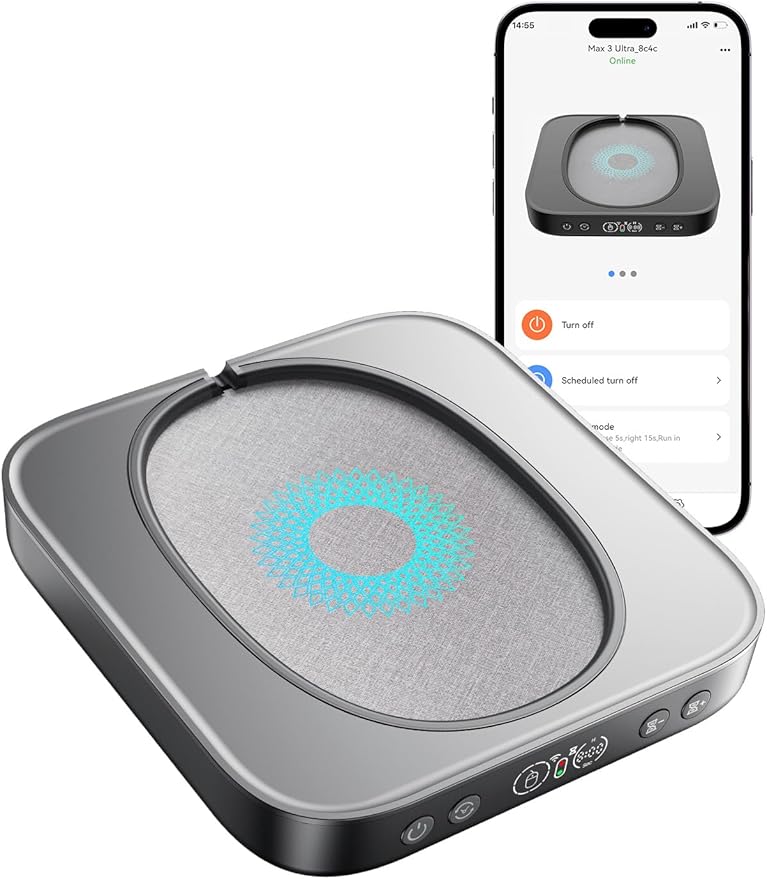
Meatanty App-Controlled Mouse Jiggler

Meatanty App-Controlled Mouse Jiggler

The Meatanty mouse jiggler stands at the cutting edge of mouse movement technology with its innovative smartphone app control capabilities. This advanced system allows you to remotely adjust pause times between movements, schedule automatic shutdown after 1-8 hours, or set it to run indefinitely without physical access to the device. The large turntable design accommodates various mouse sizes without the need for cursor calibration, while edge protection ensures your mouse stays securely in place during operation. The adjustable running frequency (5-60 seconds) provides precise control over movement patterns, all displayed on the integrated LED screen. Built with an ultra-silent motor operating below 20dB, this device won't disturb even the quietest environments. The dual power supply options (USB or external adapter) provide maximum flexibility for different workplace setups.

Pros and Cons
  • proSmartphone app control for remote operation
  • proAdjustable movement frequency with visual feedback
  • proUltra-silent operation under 20dB
  • proTimer function for automatic shutdown
  • conRequires smartphone app for advanced features
  • conPrice not shown in listing - likely premium pricing
Work-Life Balance Mechanical Mouse Jiggler

Work-Life Balance Mechanical Mouse Jiggler

This mechanical mouse jiggler offers the ultimate in portability and discretion through its innovative battery-powered design. Operating without any USB connections, software, or Bluetooth, this device is completely invisible to IT monitoring systems and hardware scans. The simple pull-tab activation eliminates complex ON/OFF switches - just remove the battery tab and it's ready to use immediately. The included AA battery provides an impressive 12-24 months of continuous operation, making it virtually maintenance-free. As a purely mechanical solution, it simulates authentic mouse movement without any digital footprint that could be detected by security software. The compact, wireless design makes it perfect for travel, temporary work setups, or situations where maintaining a clean, cable-free workspace is essential. Compatible with all optical mice, both wired and wireless, without any software installation requirements.

Pros and Cons
  • proNo USB, software, or Bluetooth - completely undetectable
  • pro12-24 month battery life eliminates maintenance
  • proSimple pull-tab activation - no complex controls
  • proCompact and portable for travel use
  • conNo adjustment or customization options
  • conLimited to basic mechanical movement patterns
AUEDROT USB-C Mouse Jiggler

AUEDROT USB-C Mouse Jiggler

Designed specifically for modern computing devices, this AUEDROT USB-C mouse jiggler provides seamless compatibility with newer laptops, tablets, and systems that feature USB-C ports. The device maintains all the premium features of the AUEDROT line including the durable aluminum alloy construction and reliable USB Composite Device registration that prevents security alerts. Two distinct movement modes offer versatility: Slight Jiggler Mode maintains minimal cursor activity for basic sleep prevention, while Random Jiggler Mode creates more pronounced irregular movements suitable for avoiding detection patterns. The integrated switch button allows easy mode transitions and power control without repeatedly plugging and unplugging the device, which preserves both the device and your computer's USB port. This future-proof solution ensures compatibility with current and next-generation devices while maintaining broad operating system support.

Pros and Cons
  • proUSB-C connector for modern device compatibility
  • proCompact aluminum construction with switch control
  • proTwo jiggle modes for different applications
  • proPlug and play with no software required
  • conLimited to USB-C only devices
  • conNo USB-A adapter included
Vaydeer Ultra Slim Air 3 Mouse Jiggler

Vaydeer Ultra Slim Air 3 Mouse Jiggler

The Vaydeer Ultra Slim represents the pinnacle of discreet mouse movement technology with an incredibly thin 17.3mm profile and lightweight 105g construction. This ultra-compact design takes up minimal desk space while remaining virtually unnoticeable in professional environments. The device simulates highly realistic random mouse movement patterns that closely mimic natural human cursor behavior, making it virtually impossible to distinguish from actual user interaction. Four adjustable interval settings (10 seconds, 30 seconds, 3 minutes, or 1-60 seconds random) provide flexibility for different scenarios, from maintaining basic availability to creating authentic-looking activity patterns. The ultra-quiet micro-motor ensures silent operation even in the quietest office environments. Powered via USB-C, this device combines modern connectivity with professional-grade features while maintaining complete undetectability by IT monitoring systems.

Pros and Cons
  • proUltra-slim 17.3mm profile - virtually unnoticeable
  • proLightweight 105g design for portability
  • proRealistic random movement patterns
  • proUltra-quiet operation with micro-motor technology
  • conPremium pricing reflects advanced features
  • conUSB-C connection only

Making Your Final Decision

When selecting the ideal mouse jiggler for your needs, consider your primary use case and workplace environment. For maximum discretion in corporate settings, mechanical or battery-operated devices like the Work-Life Balance models offer complete undetectability. If you need precise control and customization, app-controlled options like the Meatanty provide advanced features. Budget-conscious users can find excellent value in AUEDROT's USB solutions, while professionals who demand premium features should consider Vaydeer's advanced models. Always verify compatibility with your specific mouse type and operating system before purchasing. Remember that the best mouse jiggler is one that meets your functional requirements while remaining appropriate for your work environment and technical constraints.

Topics

Explore our comprehensive guides covering mouse jiggler software, workplace applications, and screen management solutions.

Our Expert Authors

Technology and productivity specialists dedicated to providing practical mouse jiggler solutions

  • Ivy Chen

    Ivy Chen

    Tutorial editor creating clear, step-by-step guides that make complex skills accessible and time-efficient.

  • Lucas Kim

    Lucas Kim

    Workplace journalist focused on productivity, leadership, and hybrid work culture.

  • Alex Rivera

    Alex Rivera

    Technology reporter who turns complex tech news into practical advice for everyday decisions.

Frequently Asked Questions

Get answers to common questions about mouse jigglers and computer activity solutions